We've been using FeedBurner Email Distribution for years, to provide a turnkey email based publication distribution.
With any email distribution system, the most essential function, in list management, is to add and remove subscriber entries. FeedBurner gives you that ability - if you look, carefully.
The "Subscription Management" tab in the FeedBurner dashboard "Publicize" section, lets you maintain the subscriber list - when you can find the wizards.
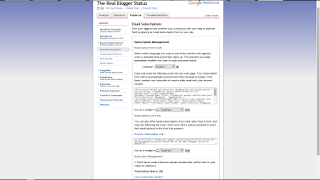
Start from Publicize - "Email Subscriptions" - "Subscription Management". Look at the very bottom of the page, for "Subscriber Management".
There, you'll see the Email Subscriber Count - and Subscriber Details.
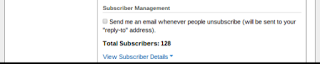
Click on "View Subscriber Details".
"View Subscriber Details" has 3 sections.
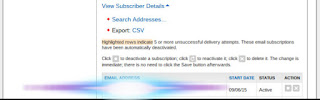
There you find the subscriber list.
Using a combination of "Search Addresses" and sorting the list by clicking on the columns, you can find and remove any subscriptions necessary. You can deactivate / reactivate, or delete, any individual subscription.
The "Status" column helps you identify unverified subscriptions - an important diagnostic, for complaints of non received (and eagerly awaited) email updates. Look for "Active" (aka "Verified"), or "Unverified".
And, using the "Preview Subscription Link" option, under "Subscription Link Code", you can add anybody - yourself or another person - to any FeedBurner feed that you publish. This can be any feed from your blog, or from somebody else's blog.
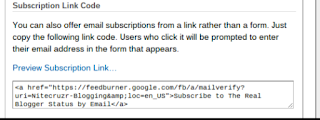
Click on "Preview Subscription Link".

And you get a form to add an email address, to the subscriber list.
Just try to avoid adding somebody, impolitely, to your feed. And remember that subscriptions must be verified, before they become active.
With any email distribution system, the most essential function, in list management, is to add and remove subscriber entries. FeedBurner gives you that ability - if you look, carefully.
The "Subscription Management" tab in the FeedBurner dashboard "Publicize" section, lets you maintain the subscriber list - when you can find the wizards.

Start from Publicize - "Email Subscriptions" - "Subscription Management". Look at the very bottom of the page, for "Subscriber Management".
There, you'll see the Email Subscriber Count - and Subscriber Details.

Click on "View Subscriber Details".
"View Subscriber Details" has 3 sections.
- "Search Addresses" lets you search the subscription list.
- "Export: CSV" lets you export the subscription list, to a CSV file, in a local folder.
- The Subscriber List, in 3 sortable columns.

There you find the subscriber list.
Using a combination of "Search Addresses" and sorting the list by clicking on the columns, you can find and remove any subscriptions necessary. You can deactivate / reactivate, or delete, any individual subscription.
The "Status" column helps you identify unverified subscriptions - an important diagnostic, for complaints of non received (and eagerly awaited) email updates. Look for "Active" (aka "Verified"), or "Unverified".
And, using the "Preview Subscription Link" option, under "Subscription Link Code", you can add anybody - yourself or another person - to any FeedBurner feed that you publish. This can be any feed from your blog, or from somebody else's blog.

Click on "Preview Subscription Link".

And you get a form to add an email address, to the subscriber list.
Just try to avoid adding somebody, impolitely, to your feed. And remember that subscriptions must be verified, before they become active.
Comments
Thanks for asking!
Start from the Publicize tab on the FeedBurner dashboard, then "Email Subscriptions" - "Subscription Management". Look in the menu, in the left sidebar.