
Label Management In The New GUI

With more people starting to use the New Blogger GUI, we're starting to see more questions about some non obvious and obscure details. Recently, people are starting to use the New GUI for routine blog maintenance, and are trying to manage their labels.
How do I add labels to my posts, using the Posts (previously the "Edit Posts") menu?
The answer is right there in front of our eyes - but we need sharp eyes.

With the Classic GUI "Edit Posts" menu, we had a pulldown menu labeled "Label Actions". Opening the menu, we would see three sections.
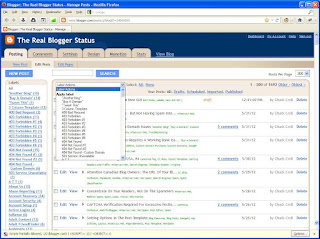
  • "Apply Label" - with an inventory of all current labels.
  • At the bottom of the "Apply Label" list, subtly placed "New Label...".
  • "Remove Label" - with an inventory of all labels in all currently selected posts.


The New GUI Posts menu has none of these. Now, we have a stylised "label" logo, with a pulldown arrow. Opening the menu, we see two sections.
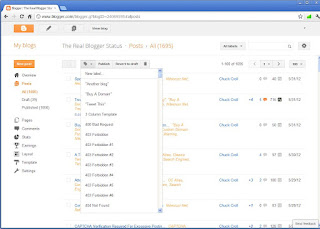
  • "New label...".
  • An inventory of all current labels.


It's not complicated, to use the new menu.
  1. Select one or more posts, in the posts list.
  2. To add a label to the posts selected, open the label menu, and click on a label.
  3. To remove a label from the posts selected, open the label menu, and click on a label.
  4. Basically, the labels menu is a toggle.
    • If you click on a label that's not part of the selected posts already (or, add a "New label"), the label gets added to the posts selected.
    • If you click on a label that's part of the selected posts already, the label gets removed from the posts selected.
    It is that simple - really.
It's just not obvious, at first glance.

Comments

cieldequimper said…
Thanks for that. I'm still clinging to the old GUI but this was one thing I had noticed an posted about in the forum.
Carley Cooper said…
For me it switched over to the new one without giving me a choice. Personally, I'd rather the old one. My only question is how do I make it work with Firefox. It totally refuses to work with Firefox. It only seems to work with Chrome. I hate Chrome. I want to go back to Firefox. How do I do that?
Nitecruzr said…
Worship,

Firefox is perfectly capable of supporting the New GUI, when configured properly. You might want to post in Blogger Help Forum: Something Is Broken, so your problem can be explored in detail.
Cindy O said…
Thanks for explaining that! I would not have thought of it as a toggle. You've saved me from some future confusion/frustration.
Picturetalk321 said…
Thanks so much!!! I've been going insane trying to find this information. I was so happy that I reposted your info with credit url at http://www.tutorholic.com/2012/01/how-to-delete-or-rename-blogger-labels.html

Thanks again.
This doesn't make sense. I just did it and if it wasn't on the post it added it. If it was on the post, it deleted it. I want the label GONE completely.. i don't want to use it anymore.I don't want it an option to choose when creating the post. How do I delete those labels?
Nitecruzr said…
Cheri,

Once you remove the label in question, from all posts, it will disappear from all label lists.

You can use the Posts dashboard page, or you can edit each post, one by one - but you have to remove the label, from all posts.

Popular posts from this blog

Add A Custom Redirect, If You Change A Post URL

When you rename a blog, the most that you can do, to keep the old URL useful, is to setup a stub post , with a clickable link to the new URL. Yo! The blog is now at xxxxxxx.blogspot.com!! Blogger forbids gateway blogs, and similar blog to blog redirections . When you rename a post, you can setup a custom redirect - and automatically redirect your readers to the post, under its new URL. You should take advantage of this option, if you change a post URL.

Jump Break Is Visible Only In An Index Page

Some blog owners are unsure what a Jump Break looks like, when applied to their blogs. Occasionally, in Blogger Help Forum: Get Help with an Issue , we see the confusion. Where's the Jump Break? or I added a Jump Break to several posts, but it never shows up! When asked for a screen print of what they're seeing, they may provide a image of the post, in the Post Editor Preview window - or possibly, the published post, but in post page view.

Leave Comments Here

Like any blogger, I appreciate polite comments, when they are relevant to the blog, and posted to the relevant article in the right blog . If you want to ask me a question thats relevant to blogging, but you can't find the right post to start with (I haven't written about everything blogger related, yet, nor the way things are going I don't expect to either), ask your questions here, or leave an entry in my guestbook . As noted above, please note my commenting policy . If you post a comment to this post , I will probably treat it as a "Contact Me" post . If you have an issue that's relevant to any technical issue in the blog, please leave a comment on the specific post , not here. This post is for general comments, and for non posted contact to me. If the form below does not work for you, check your third party cookies setting! For actual technical issues, note that peer support in Blogger Help Forum: Something Is Broken , or Nitecruzr Dot Net - Bloggin...