Your Blogger profile is the public part of your Blogger identity, that can be seen by others.
You will want your profile to provide the best representation of you - but do not display too many details. Revealing account names and email addresses, for instance, can put your blogs at risk of theft.
As a Blogger blog owner, you need to know:
If you prefer to publish a blog, without revealing any details, you are allowed to do so - and you can construct your own, custom profile displays in less than an hour. You can also choose to not share your profile.
If none of the screen prints, below, look familiar, you may need to look for a Google+ profile.
The Profile Editor.
You can edit your own Blogger profile, using the Profile Editor link. You can only edit your own profile - and only the currently active profile.
If you have a Google+ profile, you will use the Google+ desktop.
 Here is the Profile Editor. Note the 3 "Identity" settings - Username, Email address, and Display name - under Identity. Also, "Share my profile" - under Privacy. This part, only you see.
There are many sections in the Blogger Profile. Some information you may wish to be displayed, in the "About Me" / "About Us" / "Profile" gadget - if you have added one to the blog layout. Other content, you may not wish displayed.
If you need specific information displayed / not displayed, you may make your own custom "Profile" gadget, with little effort.
 This is what you see, after you make changes to your profile. Note the handy link, to display the profile, as edited.
The Profile Display.
You can display your own profile, using the various dashboard links. You can display any Blogger profile - as long as you know the ProfileID. If you (or another person) has a Google+ profile, you will use the Google+ desktop.
 Here is the Profile Display. The public sees a version of this - without the orange button.
 The orange button, leading to the Profile Editor. Only you see this - and only you can use the profile editor, for your account.
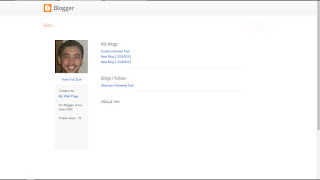 This is what the public sees - and what you may see, if you are logged in to the wrong account, or if you are affected by overly aggressive cookie filters.
The URL, in the browser address window, will be what you should provide - when the Profile ID is requested.
 And, in the browser address window, there is my profile URL.
And I know that's "me", because I also see - - - the orange button to "Edit Profile".

That's me!
Learn - and understand - what you should expect to change, and to see.
There are many sections in the Blogger Profile. Some information you may wish to be displayed, in the "About Me" / "About Us" / "Profile" gadget - if you have added one to the blog layout. Other content, you may not wish displayed.
If you need specific information displayed / not displayed, you may make your own custom "Profile" gadget, with little effort.
Knowing what you should see - when properly logged in to Blogger, using the right account - can go a long way to identifying many reported problems, when the dashboard lacks key content.
Knowing what you can see - as compared to what other people can see - can help identify problems with multiple accounts. And identifying what access you have, to each blog, can be a useful diagnostic technique too.
So know how to use the Profile Display and Editor, and the dashboard - and help yourself as a blog owner. Be aware of what you can, and what you cannot, change. And understand how to identify the owner of a blog, how to find your Blogger profile, and maybe your Google+ profile, to help others to help you.
You will want your profile to provide the best representation of you - but do not display too many details. Revealing account names and email addresses, for instance, can put your blogs at risk of theft.
As a Blogger blog owner, you need to know:
- How to display your profile.
- How to edit your profile.
- How to identify your profile.
If you prefer to publish a blog, without revealing any details, you are allowed to do so - and you can construct your own, custom profile displays in less than an hour. You can also choose to not share your profile.
If none of the screen prints, below, look familiar, you may need to look for a Google+ profile.
The Profile Editor.
You can edit your own Blogger profile, using the Profile Editor link. You can only edit your own profile - and only the currently active profile.
If you have a Google+ profile, you will use the Google+ desktop.

There are many sections in the Blogger Profile. Some information you may wish to be displayed, in the "About Me" / "About Us" / "Profile" gadget - if you have added one to the blog layout. Other content, you may not wish displayed.
If you need specific information displayed / not displayed, you may make your own custom "Profile" gadget, with little effort.

The Profile Display.
You can display your own profile, using the various dashboard links. You can display any Blogger profile - as long as you know the ProfileID. If you (or another person) has a Google+ profile, you will use the Google+ desktop.


The URL, in the browser address window, will be what you should provide - when the Profile ID is requested.

And I know that's "me", because I also see - - - the orange button to "Edit Profile".

That's me!
https://www.blogger.com/profile/06257081384482527026So, any time you ask for help recovering access to your blog, and somebody asks
Please, tell us your Profile ID!or
What's the Profile URL?You can answer, with confidence, your version of
https://www.blogger.com/profile/06257081384482527026If the profile URL includes "plus.google.com", you'll be looking at your Google+ profile.
Learn - and understand - what you should expect to change, and to see.
There are many sections in the Blogger Profile. Some information you may wish to be displayed, in the "About Me" / "About Us" / "Profile" gadget - if you have added one to the blog layout. Other content, you may not wish displayed.
If you need specific information displayed / not displayed, you may make your own custom "Profile" gadget, with little effort.
Knowing what you should see - when properly logged in to Blogger, using the right account - can go a long way to identifying many reported problems, when the dashboard lacks key content.
Knowing what you can see - as compared to what other people can see - can help identify problems with multiple accounts. And identifying what access you have, to each blog, can be a useful diagnostic technique too.
So know how to use the Profile Display and Editor, and the dashboard - and help yourself as a blog owner. Be aware of what you can, and what you cannot, change. And understand how to identify the owner of a blog, how to find your Blogger profile, and maybe your Google+ profile, to help others to help you.
Comments
It was a very long time ago, but I heard Google+ profiles were going to replace Blogger profiles completely. I'm not sure if that's still the plan, but I'm not too worried about it, because my Google+ profile seems to work well enough for me.
I really appreciate everything you share here, so thanks :)
Thanks for the question!
If you have a Google+ profile, that will be another story to tell.
Google+ just changed their GUI, and I have yet to explore the new Google+ profile editor. I'm betting it will be really shiny.
Google+ profiles were, I think, originally intended to replace Blogger profiles - but that would only happen if Google convinced everybody to setup Google+ accounts. I don't think that's happening, though.