The process of deleting your blog has been a challenging issue for some time.
Prepare for the deletion first. Consider the issues.
The deletion process itself is not complicated. Start from the dashboard Settings - Other screen.
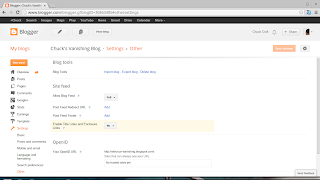
There's the link - "Delete blog" - right at the top of the screen. Easy to find, and to click on.
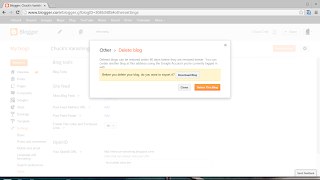
Having clicked on the link, we get a good stern warning.
And a link to let you export the blog contents, before deleting the blog. I'd export first, any time. Just note, you will be able to restore the blog for up to 90 days after deletion - and then, never.
Note that the blog may disappear from your dashboard - but removing it from the search engines may take some planning. If you truly want to get rid of a blog (or the URL, anyway), you have 2 just choices:
>> Top
Prepare for the deletion first. Consider the issues.
- The implications of the deletion.
- An interaction with custom domains.
- The latency limitations of deleting a blog.
The deletion process itself is not complicated. Start from the dashboard Settings - Other screen.

There's the link - "Delete blog" - right at the top of the screen. Easy to find, and to click on.

Having clicked on the link, we get a good stern warning.
Deleted blogs can be restored within 90 days before they are removed forever.Plain enough?
And a link to let you export the blog contents, before deleting the blog. I'd export first, any time. Just note, you will be able to restore the blog for up to 90 days after deletion - and then, never.
Note that the blog may disappear from your dashboard - but removing it from the search engines may take some planning. If you truly want to get rid of a blog (or the URL, anyway), you have 2 just choices:
- Transfer control of the blog to someone else, carefully.
- Make the blog into a stub, then re publish the stub under another URL.
>> Top
Comments
You can back up the comments and posts - not the gadgets or template though. You can back up the template, separately. There's no solution for backing up the gadgets yet.