Since FaceBook is not a part of Google, they have concerns and problems which only they can deal with.
Some problems with FaceBook affect our enjoyment of our blogs. Right now, there is a problem with aggregation of Likes and links, when our blogs are referenced in FaceBook - where all references should be properly "counted" under the common "blogspot.com" URL of each blog, instead of the individual country code aliases.
FaceBook does provide a page to "Report a Problem" - and they have a "FaceBook Help Center" community page.
If the latter links are no help, try the FaceBook Developers toolbar, with interesting links.Those are good possibilities, for advanced problems.
If you search FaceBook right now, you may find more. The helpful document Help Center: Report a Broken Feature.
Finding, and clicking on the "blue arrow", we see a series of GUI displays, and tiny forms.
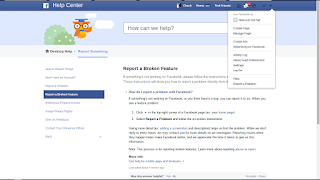
See the tiny "v" in the upper right corner of the screen? Click on that - and find "Report a problem", in the pop down list.
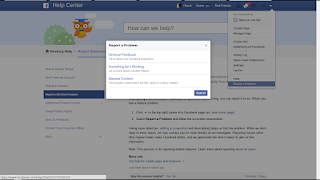
Select "Something Isn't Working" (D'ohh!).
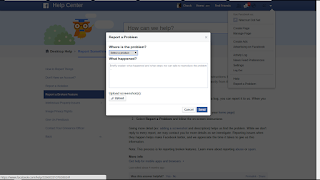
Personally, I would write my problem report off line, and edit it - then copy and paste into "What happened?".
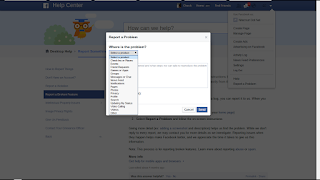
I don't see any selections that suggest links, Likes, or any reference outside FaceBook itself - so "Other" is about the only choice, here.
Maybe, the problem that you are here for is in the list, though.
If your blog or domain is blocked, by FaceBook, you can appeal using Facebook Blocks. If the problem is a custom domain, I would first ensure that the domain is addressed properly.
Now, everybody who publishes a Blogger blog, and has a FaceBook account - and is concerned about fragmentation of our blog "reputation", from the Likes and links that are not properly aggregated - needs to use the FaceBook form, and let them know that this is a problem.
This will only be properly reported by the FaceBook account owners. This is not a problem for Blogger Support. When you ask for help. start by using the FaceBook Debugger tool, and generate a list of the Open Graph code for the blog or post.
Some problems with FaceBook affect our enjoyment of our blogs. Right now, there is a problem with aggregation of Likes and links, when our blogs are referenced in FaceBook - where all references should be properly "counted" under the common "blogspot.com" URL of each blog, instead of the individual country code aliases.
FaceBook does provide a page to "Report a Problem" - and they have a "FaceBook Help Center" community page.
If the latter links are no help, try the FaceBook Developers toolbar, with interesting links.Those are good possibilities, for advanced problems.
If you search FaceBook right now, you may find more. The helpful document Help Center: Report a Broken Feature.
If something's not working on Facebook, or you think there's a bug, you can report it to us. When you see a feature problem:This is accompanied by the suggestion
- Click the blue arrow in the top-right corner of a Facebook page (ex: your home page)
- Select Report a Problem and follow the on-screen instructions
Giving more detail (ex: adding a screenshot and description) helps us find the problem.and the motivation
While we don't reply to every report, we may contact you for more details as we investigate.
Finding, and clicking on the "blue arrow", we see a series of GUI displays, and tiny forms.

See the tiny "v" in the upper right corner of the screen? Click on that - and find "Report a problem", in the pop down list.

Select "Something Isn't Working" (D'ohh!).

Personally, I would write my problem report off line, and edit it - then copy and paste into "What happened?".

I don't see any selections that suggest links, Likes, or any reference outside FaceBook itself - so "Other" is about the only choice, here.
Maybe, the problem that you are here for is in the list, though.
If your blog or domain is blocked, by FaceBook, you can appeal using Facebook Blocks. If the problem is a custom domain, I would first ensure that the domain is addressed properly.
Now, everybody who publishes a Blogger blog, and has a FaceBook account - and is concerned about fragmentation of our blog "reputation", from the Likes and links that are not properly aggregated - needs to use the FaceBook form, and let them know that this is a problem.
This will only be properly reported by the FaceBook account owners. This is not a problem for Blogger Support. When you ask for help. start by using the FaceBook Debugger tool, and generate a list of the Open Graph code for the blog or post.
Comments