One very useful FeedBurner service is the Email Distribution feature.
Email Distribution is virtually a turnkey subscription management. Email Distribution has one limitation, which not everybody understands, however.
FeedBurner delivers any new posts once daily, based on a chosen distribution time. Depending upon what distribution time you choose, for any FeedBurner Feed, you can have anywhere from 0 hours, to 24 hours - of delay, between publishing a post, and having that post distributed by email.
From the FeedBurner dashboard, click on the specific feed, in the "My Feeds" list.
When you have the dashboard for the feed required, click on "Publicize", then "Email Subscriptions", and finally "Delivery Options".
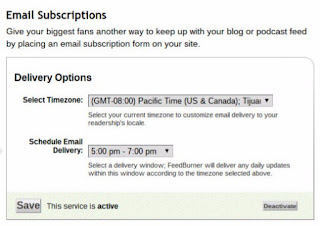
Use the "Delivery Options" tab to set time zone, then select from any of 12 convenient 2-hour windows for email delivery.
To minimise delivery delay, schedule daily activity, just before distribution.
To minimise email distribution delay, you choose the daily distribution time carefully - then publish immediately before the daily scheduled distribution.
Choose any one of 12 2-hour email delivery windows.
You choose a 2 hour delivery window. This gives you a 22 hour publishing window, which precedes the 2 hour delivery window. All posts published within the 22 hour publishing window will be delivered within the 2 hour delivery window. Posts published within the 2 hour delivery window may be delivered that day - or the following day.
You will still have a single daily distribution time - but you can choose an appropriate distribution window. And, you can publish just before the chosen distribution window.
Alternately, setup multiple feeds, each delivering email at different times.
Using a new concept, you can have multiple FeedBurner feeds, each with its own distribution window. If your blog serves readers in multiple time zones, you can deliver email at the same local time, for each time zone. Or, you can have multiple publishing activity windows, depending upon your personal workload for different days.
Email Distribution is virtually a turnkey subscription management. Email Distribution has one limitation, which not everybody understands, however.
FeedBurner delivers any new posts once daily, based on a chosen distribution time. Depending upon what distribution time you choose, for any FeedBurner Feed, you can have anywhere from 0 hours, to 24 hours - of delay, between publishing a post, and having that post distributed by email.
From the FeedBurner dashboard, click on the specific feed, in the "My Feeds" list.
When you have the dashboard for the feed required, click on "Publicize", then "Email Subscriptions", and finally "Delivery Options".

Use the "Delivery Options" tab to set time zone, then select from any of 12 convenient 2-hour windows for email delivery.
To minimise delivery delay, schedule daily activity, just before distribution.
To minimise email distribution delay, you choose the daily distribution time carefully - then publish immediately before the daily scheduled distribution.
- Choose a convenient distribution time window.
- Using "Schedule Email Delivery", choose the corresponding daily 2 hour window, for email distribution.
- Publish posts immediately before the start of the chosen time window.
Choose any one of 12 2-hour email delivery windows.
You choose a 2 hour delivery window. This gives you a 22 hour publishing window, which precedes the 2 hour delivery window. All posts published within the 22 hour publishing window will be delivered within the 2 hour delivery window. Posts published within the 2 hour delivery window may be delivered that day - or the following day.
You will still have a single daily distribution time - but you can choose an appropriate distribution window. And, you can publish just before the chosen distribution window.
Alternately, setup multiple feeds, each delivering email at different times.
Using a new concept, you can have multiple FeedBurner feeds, each with its own distribution window. If your blog serves readers in multiple time zones, you can deliver email at the same local time, for each time zone. Or, you can have multiple publishing activity windows, depending upon your personal workload for different days.
Comments
Thanks for the question.
I'm not aware of any specific numeric limit, with FeedBurner email. If you're still interested, you might want to ask in FeedBurner Support Forum.