Occasionally in Blogger Help Forum: Something Is Broken, we see a curious question.
Look at the Stats Overview tab, and the graph at the top of the display.
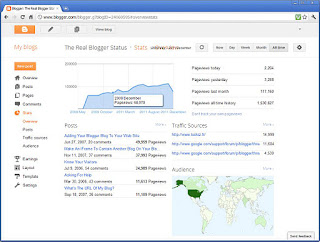 What happened to "2010"?
My suspicion is that it's a deliberate omission, to get the graph to fit in the limited horizontal space. How will they get "All Time" to fit in that space, as the Stats display gets older, and "All Time" covers more years?
That being the case, it should not be that much work to add a little "broken line" symbol in the border, between "2009 October" and "2011 March". Look how smoothly the line flows, in my graph, right through 2010. What does your blog show?
Fast forward to 2015, and we'll know the answer.
And in 2012, we now see the same display oddity with the numbers from 2011.
>> Top
My blog Stats display is missing a complete year.The problem is actually right there, in front of all of us - if we look.
Look at the Stats Overview tab, and the graph at the top of the display.
 What happened to "2010"?
My suspicion is that it's a deliberate omission, to get the graph to fit in the limited horizontal space. How will they get "All Time" to fit in that space, as the Stats display gets older, and "All Time" covers more years?
That being the case, it should not be that much work to add a little "broken line" symbol in the border, between "2009 October" and "2011 March". Look how smoothly the line flows, in my graph, right through 2010. What does your blog show?
Fast forward to 2015, and we'll know the answer.
And in 2012, we now see the same display oddity with the numbers from 2011.
>> Top
Comments